SharePoint ShortUrl
SharePointのページ、リストの項目、ドキュメント、ビュー、外部リンクの短いURLを作成
SharePointのページ、リストの項目、ドキュメント、ビュー、外部リンクの短いURLを作成
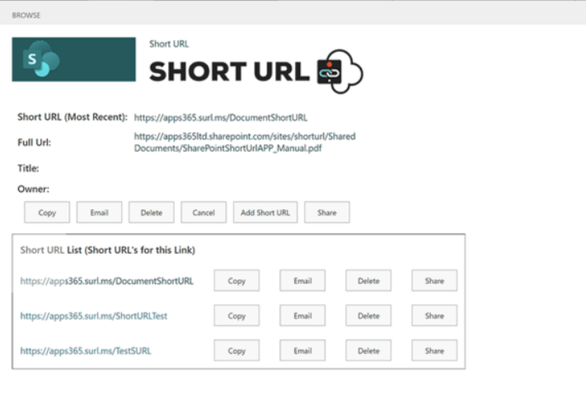
任意のSharePointのページ、リストアイテム、ドキュメント、ビューまたは外部リンク用に短いURLを作成できます。SharePoint ShortUrlは完全にSharePoint環境内で利用可能な、ショートカットのハイパーリンクの作成および使用を可能にするSharePointソリューションです。特に大規模で複雑なインストールでよくある、SharePointサイトコレクションの構造が、醜くエラーを起こしがちなハイパーリンクとなってしまうような異常に長いハイパーリンクとなることがあります。たとえば、ドキュメントライブラリ内のフォルダーに次のハイパーリンクを比較します: https://yoursite/clients/abc%20company/Shared%20Documents/Forms/AllItems.aspx?RootFolder=%2fclients%2fabc%20company%2fShared%20Documents%2fClient%20Requirements&FolderCTID=&View=%7b80C76B49%2dFA92%2d490E%2dAFBF%2d8A07F9C73CCE%7d.SharePoint ShortUrlを使用すれば、https://yoursite/clients に短縮することができます。これにより、メールアドレスのリンクをドキュメント内に入れたり、電話で口頭で伝える場合でもより簡単になり、間違いを起こしにくくなります。
Using SharePoint ShortUrl a shortened hyperlink can be created for any Page, List Item, Document and View within SharePoint. With SharePoint ShortUrl you can create ShortUrl’s directly from the Site Actions Menu and/or any List/Library items Context Menu. If a ShortUrl has already been created, you can instantly copy to the clipboard, email the link directly (the link will be opened in your email client) and edit the shortened hyperlink. All the ShortUrl’s are stored in a regular SharePoint List which allows for all of the standard List functionality of audit trails, workflow, security permissions and item approval.
Why Use Short URL?
SharePoint ShortUrl Features
電話: (888) 850 9911
Fax: +1 770 250 6199