Syncfusion Essential Studio DOCX Editor SDK について

Word文書編集用の包括的なDOCXエディターSDK

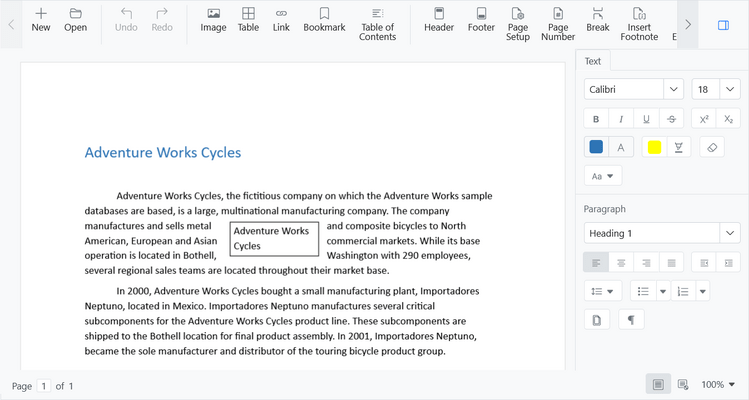
The Syncfusion DOCX Editor SDK provides a Microsoft Word-inspired WYSIWYG editor for developers who want to integrate Word document drafting, editing, and report generation in their web and .NET-based desktop applications.

Key Features

  • Document Editing - The DOCX editor offers a smooth, touch-friendly editing experience with features like clipboard operations, undo and redo, context menus, and dialogs.
  • Report Generation - Generate real-time reports by mail merging or replacing placeholders within templated Word documents.
  • Layout and Formatting - Create professional documents with powerful formatting tools for text, lists, images, tables, and more. Customize page sizes and add consistent headers and footers for a polished look.
  • Design and Fill Forms - Users can design fillable forms in a Word document using form fields and content controls. The DOCX Editor SDK provides a form-filling mode to focus only on filling data for the fields.
  • Collaborative Editing - Multiple users can edit a document simultaneously, see each other's presences, and view changes as they happen in real time.
  • Document Versioning - Compare two Word document versions and view the tracked changes as highlighted differences.
  • Review Documents - Add, reply, edit, delete, or resolve comments within a document. Use @mentions to tag others in comments for smooth collaboration, and track changes so others can review, accept, or reject them.
  • Restrict Editing - Add range permissions within a protected document so only authorized users or user groups can modify designated text areas. Also, you can restrict operations like accepting or rejecting tracked changes, allowing users only to comment.

Why choose Syncfusion Essential Studio DOCX Editor SDK?

  • High Performance - The DOCX Editor has been designed and optimized for high performance.
  • Microsoft-Word-like editor - The DOCX Editor is a feature-rich Word document editor component. With it, you can add a Microsoft-Word-like word processing solution in your web application.
  • Add notes using comments - You can add comments to documents using Word Document Editor. In both code and the UI, you may add, navigate, and remove comments.
  • Track and review changes - The track changes feature keeps a record of changes and edits made to a document. You can then accept or reject the changes. It is a useful tool for managing modifications made by multiple reviewers in the same document.
  • Attractive, customizable themes - Cutting-edge design with several built-in themes, such as Fluent, Tailwind CSS, Bootstrap, Material, and Fabric. Utilize the online Theme Studio tool to customize themes of word editor easily.
  • Globalization and localization - Enable users from different locales to use the component by formatting dates, currency, and numbering to suit preferences.