Syncfusion Essential Studio PDF Viewer SDK について

Web、デスクトップ、モバイルプラットフォーム全体でPDFの表示、注釈、フォーム入力、署名が可能

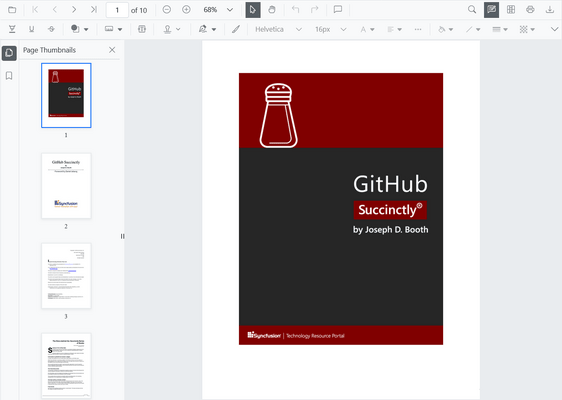
The Syncfusion Essential Studio PDF Viewer SDK provides a powerful, high-performance solution for viewing PDF documents. It enables developers to seamlessly integrate features such as document navigation, interactive tools, form filling, digital signing, and annotation reviews into web, desktop, and mobile applications.

Key Features

  • Digital Document Viewing - View PDF documents with text, images, vector graphics, and embedded fonts exactly as intended across all devices. Interactive zoom and pan controls give you optimal document display.
  • Document Navigation - Easily navigate PDF documents with smooth page transitions, document links, hyperlinks, and an outline view.
  • Text Search and Selection - Powerful text selection and search functionalities allow users to find, select, and interact with textual content easily within PDF documents.
  • Annotation and Review Tools - Comprehensive annotation tools for reviewing PDF documents including highlights, comments, stamps, text, and freehand drawings
  • Interactive Form Filling - Complete form-filling capabilities with support for text fields, checkboxes, radio buttons, dropdowns, and signature fields.
  • Electronic Signatures - Add, remove, and manage signatures in PDF documents with multiple signature types, including handwritten, typed, and image-based.

Why choose Syncfusion Essential Studio PDF Viewer SDK?

  • High performance - Thousands of PDF pages can be loaded instantly. On-demand loading and virtualization support helps reduce the initial loading time for larger PDF files.
  • Rich annotating tools - The PDF Viewer offers various annotations including text markup, shape, stamp, sticky note, measurement, free-text, and ink.
  • Easy to interact - Interact effortlessly with PDFs using selection and panning modes in the PDF Viewer.
  • Flexible comment panel - Use the comment panel to insert annotations, respond to comments, and manage statuses in the PDF.
  • Add handwritten signatures - Add handwritten signatures to your PDF files and easily customize them by resizing, moving, deleting, or saving. A simple way to enhance your digital workflow.
  • Adapts to any resolution - The PDF Viewer is designed to be responsive with an optimized design for desktops, touchscreens, and smart phones. It works well on all mobile phones that use iOS, Android, or Windows OS.
  • Attractive, customizable themes - Cutting-edge design with several built-in themes, such as Fluent, Tailwind CSS, Bootstrap, Material, and Fabric. Utilize the online Theme Studio tool to customize themes easily.
  • Globalization and localization - Enables users from different locales to use the component by formatting the text content to suit their preferences.