ThinkAutomation のリリース
Released: Mar 27, 2023
v5.0.930 での更新項目
機能
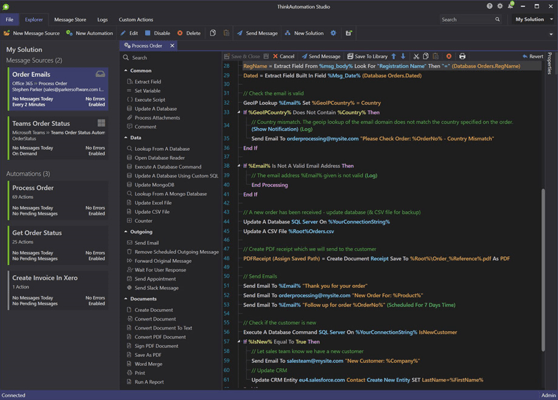
- Automation Live Debugging - You can now debug an Automation from the Studio and step through actions to see current variable values.
- The 'File Operation' action 'Copy' operation now has an 'Overwrite' setting and you can also specify a different destination file name.
不具合の修正
- Fixed issue with Database Lookup action where column assignments used column numbers instead of names.
- Fixed issue with non-admin user not allowed to reprocess messages even when Allowed To Reprocess right enabled for the...
Released: Mar 16, 2023
v5.0.925 での更新項目
機能
- Added new 'List Operation' action. A generic action for creating, updating, sorting and searching lists of values. You can read a single list value or all values. Complete lists can be returned as text, JSON array, markdown table, CSV or HTML list.
- Automations will now show grouped by Automation Group Name when viewing in the Studio Explorer. Automation group names can be set on the Automation Properties tab.
- The 'Moving Incoming Message' action now works with Microsoft Exchange message...
Released: Feb 28, 2023
v5.0.920 での更新項目
機能
- Added the option to use your own App Registration for Microsoft/Office 365 logins. You can now specify your own client ID, client secret and tenant id for each Solution or globally. These will override the defaults for Office 365 logins. You must create your own App Registration in Microsoft Azure.
- Added Quick View to Automations view in the Studio. You can now click the > button in the Automation block to quickly view its actions without opening it. This view also shows the Message Source...
Released: Feb 8, 2023
v5.0.912 での更新項目
機能
- Added new 'Extract Address Parts' action for parsing and extracting address fields from postal addresses.
- Added new 'Extract Using Text Range' option to the 'Extract Field' action. This allows free-form extraction of text using left, top, right and bottom character coordinates. This makes it easier to extract fixed position data from document type text (invoices, quotes etc).
- You can now change the sort order of Message Sources and Automations in the daily summary report email.
- The 'HTTP Get'...
Released: Jan 20, 2023
v5.0.910 での更新項目
機能
- Added 'Ends With' to 'Select Case' action.
- Added option to automatically create multiple 'Extract Field' actions from a given block of text or JSON.
- Web Form message sources can now use a button group or a radio button group for 'Must Be In List' validation.
- Added 'Rating' input type for Web Forms.
- You can now set the visibility of individual input fields for Web Form message sources. As a user moves through the form entering values the visibility of all other fields will be refreshed.
- Web...
Released: Dec 14, 2022
v5.0.900 での更新項目
機能
- The 'Run A Program' action now has an option to execute the process via the Studio/Desktop Connector.
不具合の修正
- Fixed issue with Run A Report action. The report designer crashed if an external Excel or CSV data source was added.
- Fixed issue with IMAP Message Source not reading new messages after first run when connected to certain IMAP servers.
- Fixed issue with Office 365 Create Appointment action where an All Day Event spanned multiple dates.
- The Print action header font was too small.
Released: Nov 25, 2022
v5.0.898 での更新項目
機能
- Improved handling of invalid incoming email MIME text where attachments had duplicate Content-ID header values.
- You can now enable the 'Message Source Auto Pause' option separately for message source and automation errors. You can also enable 'Send Notification On Message Source Errors' separately from the 'Auto Pause' option.
- Added Recalculate option to 'Update Excel File' action. This option will ensure all formulas are recalculated after the update. A Password entry has also been added for...
Released: Nov 9, 2022
v5.0.890 での更新項目
機能
- The 'Create Office 365 Appointment' action now lists time zones available to the signed-in user (if a %variable% replacement is used for this value then it must be one of the time zones listed).
- You can now adjust the number of message processor tasks that the Message Processor Service starts. The higher the tasks the more Automations can process messages at the same time (but with potential higher memory requirement).
- Added 'Replace: Regex' option to 'Text Operation' action for regex...
Released: Oct 19, 2022
v5.0.880 での更新項目
機能
- Added
Get User Presence action for reading current presence information for one or more Microsoft Office 365 users.
- Added
Message Source - Microsoft Graph Changes. This message source tracks changes for Microsoft Graph entities: Calendar Events, Organization Contacts, Users and Teams Channel messages.
Message Source schedules can now be restricted to days of the week and times during the day (eg: Active Monday-Friday, between 9am-pm).- The
Call A Web Service action now has a Test button...
Released: Oct 4, 2022
v5.0.875 での更新項目
機能
- For database action types you can now select an existing connection string from other actions in the same solution instead of building/entering the connection string on each action.
- The 'Cloud Storage' action now supports wildcards for downloading files (Eg: /myfiles/docs/*.pdf).
- The Gmail message source now has the option to permanently delete processed messages (or delete and move to the Trash folder).
不具合の修正
- Fixed issue with Cloud Storage action where the full path was not specified in the...