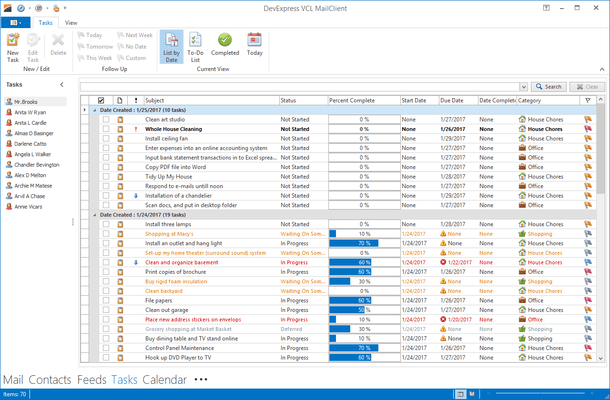
ExpressGridPack(英語版)

DelphiおよびC ++ Builderアプリケーションに、包括的なグリッド、印刷、ピボットテーブル、ツリーリスト、レイアウト、スキニング機能を追加

DevExpress 社の製品
2001 年より日本国内にてComponentSourceで販売中。

価格:¥ 114,180 (税込)〜 バージョン: 25.2.6 新機能 更新日: Apr 7, 2026 レビューの平均スコア: 4.00レビューの平均スコア: 4.00レビューの平均スコア: 4.00レビューの平均スコア: 4.00レビューの平均スコア: 4.00 (2)

i

New licenses for ExpressGridPack are no longer available. Existing customers can continue to renew. If you are looking for a new license, please consider DevExpress VCL Subscription, which includes all ExpressGridPack components plus more.

ExpressGridPack のリリース

Released: Nov 27, 2019

19.1.7 での更新項目

不具合の修正

ExpressEditors Library

  • cxComboBox - The item selection state in a combo box dropdown window does not update according to the combo box edit value in certain cases, provided that the Properties.DropDownListStyle property is set to lsEditList
  • cxDateEdit - The modern-style drop-down calendar truncates day names if the MingLiU font is used and the "Chinese (Traditional, Taiwan)" format is selected in the system's regional settings
  • TcxShellListView - A shell item being dragged can be dropped...

Released: Oct 15, 2019

19.1.6 での更新項目

不具合の修正

ExpressEditors Library

  • A value selected via the "Select a Value..." combo box on an Excel-inspired filter dropdown's "Numeric Values" tab does not update the filter criteria for a container control item whose data type is FmtBcd
  • In-place cxCheckComboBox - A container control item's cells do not show the hint passed as the AData.ErrorText parameter in the item's OnValidateDrawValue event handler for an error icon
  • TcxCustomDropDownEdit descendants apply the form transparency to their popup...

Released: Sep 11, 2019

19.1.5 での更新項目

不具合の修正

ExpressEditors Library

  • The Excel-inspired filter popup slowly populates its Values tab's tree with date-time values.
  • Data-aware TcxCustomTextEdit descendants switch the bound dataset to the edit mode when the Ctrl+A key combination is pressed.
  • Reloading TcxCustomGroup descendants from a DFM file incorrectly sizes embedded controls whose Anchors property value includes the [akLeft,akRight] or [akTop,akBottom] flag combination.
  • TcxContainer descendants located in a control embedded in a...

Released: Jul 8, 2019

19.1.3 での更新項目

不具合の修正

ExpressEditors Library

  • cxLookupComboBox - Incremental filtering works incorrectly if the Properties.DropDownListStyle property is set to lsFixed.
  • ShellListView in Thumbnail mode converts "&" to underscore.
  • TcxCustomDropDownEdit and descendants - Selection highlight can duplicate in an editor's drop-down window when scrolling items with the mouse wheel in Windows 8 or later.
  • TcxCustomGroupBox and descendants - A caption is cropped if one of certain skins is applied.
  • The Excel-inspired...

Released: Jun 18, 2019

19.1.2 での更新項目

機能

Right-To-Left Support

  • This release adds Right-to-Left (RTL) support to the following DevExpress VCL components:
    • Pivot Grid Control
    • Vertical Grid Control

Filtering UI

  • Excel-inspired Filtering - v19.1 introduces new Microsoft Excel-inspired column/row filter dropdowns for the Grid, TreeList, and Vertical Grid controls. New filter dropdowns provide two tabs:
    • The first tab allows users to select from among all available cell values.
    • The second tab allows users to create a filter expression using...

Released: Jun 4, 2019

18.2.8 での更新項目

不具合の修正

ExpressEditors Library

  • cxLabel - An editor is scaled incorrectly if it is anchored to the right edge of its parent and has an associated style controller.
  • cxLookupComboBox - The EditValue property value can change to Null Variant if the Properties.DropDownListStyle property is set to lsFixedList, and the ifoUseContainsOperator flag is in the Properties.IncrementalFilteringOptions property value.
  • Increasing the Filter Builder dialog's font size displays a horizontal scrollbar...

Released: May 7, 2019

18.2.7 での更新項目

不具合の修正

ExpressEditors Library

  • cxCheckListBox - An editor placed on an form does not add the cxCheckBox unit to the 'uses' clause, which can result in compile time errors if certain API members of the editor are used in code.
  • TcxButton - A TBasicAction descendant's OnHint event never occurs if the action object is linked to a button.
  • TcxCustomComboBox and descendants - A dropdown window scrollbar scales incorrectly.
  • TcxCustomTextEdit and descendants - An editor produces a sound on pressing the...

Released: Mar 28, 2019

18.2.6 での更新項目

不具合の修正

ExpressEditors Library

  • Checking an item in a filter dropdown found in the Grid, Tree List, and Vertical Grid controls does not remove the filter condition that corresponds to the (NonBlanks) item from the filter criteria.
  • TcxRichEdit -  Text formatting attributes are discarded on changing the Enabled property value.
  • TcxDBCombobox ignores TField DisplayFormat.
  • TcxRichEdit scales badly on dpi change.

ExpressPrinting System

  • Grid Report Link - Chart View - View's content is scaled twice on...

Released: Feb 27, 2019

18.2.5 での更新項目

不具合の修正

ExpressEditors Library

  • An AV occurs on calling the cxDrawRichEdit function whose optional ScaleFactor parameter is omitted or set to nil.
  • An in-place cxRichEdit editor wraps the cell content if the Properties.WordWrap property is set to False.
  • cxLabel - An editor truncates its growing caption and displays an ellipsis instead of automatic label width increase if both the AutoSize and Properties.ShowEndEllipsis properties are True.
  • cxTextEdit - The Ctrl+A key combination sets the...

Released: Jan 22, 2019

18.2.4 での更新項目

不具合の修正

ExpressEditors Library

  • Changed ModifiedAfterEnter Behaviour with 18.2.2.
  • cxCalcEdit not allowing to enter a leading decimal in data - 64-bit only.
  • cxCheckBox - An image assigned to the Properties.Glyph property is displayed incorrectly if it contains semitransparent pixels.
  • cxCheckBox - The caption is displaced 1 pixel down compared with the standard VCL TCheckBox component of the same height that is less than 23 pixels.
  • cxCheckComboBox - Hovering the mouse pointer over a redisplayed drop...