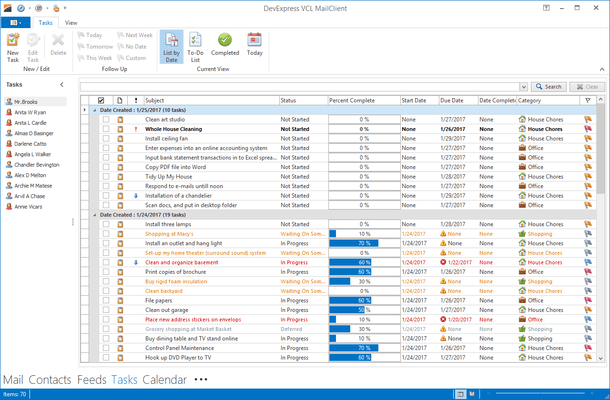
ExpressGridPack(英語版)

DelphiおよびC ++ Builderアプリケーションに、包括的なグリッド、印刷、ピボットテーブル、ツリーリスト、レイアウト、スキニング機能を追加

DevExpress 社の製品
2001 年より日本国内にてComponentSourceで販売中。

価格:¥ 114,180 (税込)〜 バージョン: 25.2.6 新機能 更新日: Apr 7, 2026 レビューの平均スコア: 4.00レビューの平均スコア: 4.00レビューの平均スコア: 4.00レビューの平均スコア: 4.00レビューの平均スコア: 4.00 (2)

i

New licenses for ExpressGridPack are no longer available. Existing customers can continue to renew. If you are looking for a new license, please consider DevExpress VCL Subscription, which includes all ExpressGridPack components plus more.

ExpressGridPack のリリース

Released: Jun 15, 2017

17.1.3 での更新項目

不具合の修正

ExpressEditors Library

  • dxBarCode - Add the capability to customize sizes of barcode quiet zones.
  • TcxCustomInnerListBox descendants - Changing font attributes causes the "Control '' has no parent window" exception in certain cases.
  • TcxSplitter - The Width and Height properties of the vertical and horizontal splitters are reset to the default values on calling the form constructor and changing the splitter's Look & Feel settings.
  • TcxTreeView - Calling the TcxTreeView.Items.Clear...

Released: May 30, 2017

17.1.2 での更新項目

機能

Grid Control

  • Row Selection Improvements - v17.1 introduces the following row selection improvements:
    • Optional web-style row selection using check boxes.
    • Customizable check box position:
    • Data rows.
    • Group rows.
    • The column header.
    • The indicator or the first column.
  • A new mode that assists end-users with persisting the current selection during row navigation.
  • Optional synchronization of selected state between group rows and their child rows to help users make their selection with fewer mouse...

Released: May 16, 2017

16.2.6 での更新項目

不具合の修正

ExpressEditors Library

  • All data-aware editors - The error icon is removed after another field in the same record has been modified.
  • All TcxCustomDropDownEdit descendants - The read-only editor's edit value can be modified by pressing Tab while the drop-down window is open if the Properties.PostPopupValueOnTab property is set to True.
  • An AV occurs on creating the cxMemo and cxRichEdit control instances by calling the CreateParented constructor.
  • Combobox dropdown not visible in Windows...

Released: Mar 28, 2017

16.2.5 での更新項目

機能

  • Adds support for Embarcadero RAD Studio, C++Builder and Delphi 10.2 Tokyo.

不具合の修正

ExpressEditors Library

  • Data-aware editors - Clicking the TcxDBNavigator control's Post button does not post the changes made to a focused editor bound to the same data source.
  • dxBarCode - An AV occurs when a TBitmap object is assigned a bar code control created at runtime if its Parent property value was never changed from nil.
  • TcxListView - An AV occurs on destroying the control in message handling methods...

Released: Mar 7, 2017

16.2.4 での更新項目

不具合の修正

ExpressEditors Library

  • cxDateEdit - Day numbers painted in bold are cropped for certain fonts if the Properties.View property is set to cavClassic.
  • cxImage - v16.2 doesn't start animation of animated GIF images.
  • Data-aware editors - Cancelling editor's editing via a DBNavigator does not hide an error icon.
  • dxTokenEdit - The editor doesn't support spell checking provided by the TdxSpellChecker component.
  • Exception in TcxBaseInnerListView.WndProc.
  • Screen tip repository preview does not size...

Released: Jan 30, 2017

16.2.3 での更新項目

不具合の修正

ExpressEditors Library

  • An in-place dxTokenEdit used in vertical grid cells doesn't display hints for tokens.
  • Crash editing value in color dialog.
  • cxCheckBox - "The handle is invalid" error occurs on setting the editor's width to 1, 2, or 3 pixels if the Properties.Glyph property is assigned.
  • Data-aware editors - Pressing the Esc key to cancel the changes made to the edit value causes incorrect error indication.
  • dxBarCode - Memory leaks when destroying the editor assigned to a TBitmap...

Released: Dec 20, 2016

16.2.2 での更新項目

機能

Editors

  • New Barcode Control - v16.2 introduces a new Barcode Control that allows you to generate barcode images within your VCL application. The initial version supports the following barcode symbologies QRCode, Code 11, Code 128, Code 39, Code 39 Extended, Code 93, Code 93 Extended, EAN-8, EAN-13, Interleaved 2 of 5, MSI, UPC-A and UPC-E. Unbound, data-aware, standalone, and in-place versions of the Barcode Control are available.
  • New Token Editor - This release ships with a new advanced text...

Released: Nov 24, 2016

16.1.6 での更新項目

機能

ExpressQuantumGrid Suite

  • Export to Excel - Match the data type of source cell values and summaries that are calculated against these values if no custom formats are applied to the summaries.

ExpressSpreadSheet

  • Improve performance when calculating dependent cell values.

不具合の修正

ExpressEditors Library

  • A fixed-style сombo box editor whose BeepOnEnter property is set to False produces a beep sound on pressing the Enter key if incremental filtering is enabled.
  • TcxListView - The content is...

Released: Oct 19, 2016

16.1.5 での更新項目

不具合の修正

ExpressLayout Control

  • Changing the ItemIndex property value of a layout group doesn't fire the group's OnTabChanged event.
  • Clicking the button that toggles the float state of a layout group hides this group if it was previously dragged.
  • Controls linked to layout items on inherited forms of certain depth of inheritance are incorrectly scaled in response to DPI changes.
  • Performance regression when scaling layout elements using the ScaleBy method compared with v15.2.

ExpressPivotGrid Suite...

Released: Sep 16, 2016

16.1.4 での更新項目

機能

ExpressSpreadSheet

  • Implemented a report designer control.

不具合の修正

ExpressLayout Control

  • All DevExpress editors - Recreating the handle of a displayed form paints a non-transparent border around editors in certain cases.
  • All DevExpress editors - The editor's border flickers on resizing the editor embedded to a skinned layout control.
  • The "Invalid pointer operation" exception occurs on removing a control linked to a layout item from a frame embedded into a form.
  • The active tab cannot be switched...