
FastReport VCL Analysis(英語版)
High-speed OLAP cube engine for fast big data analysis and generation of tables with graphs and diagrams.
Fast Reports 社の製品
2009 年より日本国内にてComponentSourceで販売中。
価格:¥ 82,830 (税込)〜 バージョン: 2026.2.x 新機能 更新日: Apr 20, 2026
High-speed OLAP cube engine for fast big data analysis and generation of tables with graphs and diagrams.
Fast Reports 社の製品
2009 年より日本国内にてComponentSourceで販売中。
価格:¥ 82,830 (税込)〜 バージョン: 2026.2.x 新機能 更新日: Apr 20, 2026
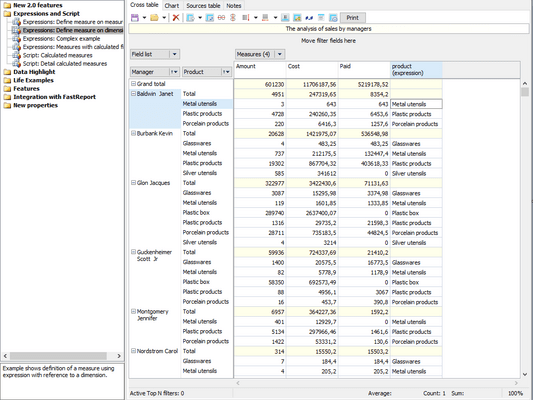
FastReport VCL Analysis is also available as part of FastReport VCL Optimum and FastReport VCL Ultimate.
High-speed OLAP cube engine for fast big data analysis and generation of tables with graphs and diagrams.
FastReport VCL Analysis is a high‑speed OLAP engine designed for Delphi, C++Builder, and RAD Studio applications, enabling developers to embed interactive pivot‑table style "cross‑table" analysis components directly into their VCL-based applications. It efficiently processes datasets in memory, transforming raw data into compact analytical cubes with multi-level headers, sortable dimensions, filtering, conditional formatting, and Top‑N selections. Users can visualize results via integrated charting (e.g. TeeChart), apply custom calculations through FastScript, and export analysis slices to Excel, Word, HTML, XML, or client dataset formats. With full VCL or Lazarus integration, customizable UI, and full source code included, Analysis VCL empowers developers to deliver robust embedded business intelligence and data‑driven decision tools.
Features and Benefits FastReport VCL Analysis
Embedding in the interface
Full customization and integration into the interface of your business application.
Data sources
Connection to databases takes place not only through standard ADO and BDE components but also through any built based on TDataSet.
Visual results
To create graphs and charts based on table slices, you can use TeeChart (both from RAD Studio and the commercial edition of TeeChart Pro).
Global filter
Use one data cube for synchronous analysis based on various criteria, built on independent filters.
Graphics core
GDI is used to create graphic elements, render text, and manage graphics.
Source code
This set of components includes source codes. Maximum convenience for companies wishing to adapt the code to their needs.
FastScript formulas
Analysis VCL uses FastScript to perform non-standard calculations. Using scripts, you can calculate indicators and filters. You can set data processing after or simultaneously with standard indicators.
For indicators, you can set filters specified by the script. This filter is used if it is necessary to calculate indicators not for all rows of the original data set, but only for selected ones. The calculation filter can be applied to both measures based on standard aggregate functions and calculated measures.
電話: (888) 850 9911
Fax: +1 770 250 6199


