Infragistics Ultimate UI for WPF(英語版)

企業アプリ開発に不可欠な速度とスケーラビリティ、タッチ操作サポート機能すべてが備わったWPFコントロール

Infragistics 社の製品
1996 年より日本国内にてComponentSourceで販売中。

価格:¥ 269,610 (税込)〜 バージョン: 25.2 新機能 更新日: Mar 23, 2026 レビューの平均スコア: 4.00レビューの平均スコア: 4.00レビューの平均スコア: 4.00レビューの平均スコア: 4.00レビューの平均スコア: 4.00 (1)

i

Infragistics WPF 製品のすべてのコントロールは Infragistics Professional 及び Infragistics Ultimate にも含まれています。

Infragistics Professional :Ignite UI, ASP.NET, Windows Forms, Windows UI, Silverlight and WPFが含まれています。
Infragistics Ultimate Ignite UI, ASP.NET, Windows Forms, Silverlight, WPF, Windows UI, Windows Phone, LightSwitch, NUCLiOS, Iguana UI, NetAdvantage ICONS, 5 ユーザーQuince Subscriptionが含まれています。

NetAdvantage for WPF LOB enhances WPF Schedule

Released: Jun 10, 2011

Updates in this release

Updates in 2011 Volume 1

  • Microsoft Word Library – NEW! - The new Word Library gives you the ability to create and work with Microsoft Word document files.  The library features the ability to write out styled text, hyperlinks, images, tables and shapes.  In addition, it provides you with document-specific features that allow you to specify the page size, margins, page breaks, and set header/footer information.  You can easily integrate this library into your WPF applications.
  • IG Theme – NEW! - The IG Theme was created to allow application developers a complete visual theme, so modern applications can be created without having to rely on the Microsoft Office brand.
  • xamGridWordWriter – NEW! - This is a new lightweight control that enables you to stream the xamGrid to a Microsoft Word document. Its implementation makes creating a Word document as simple as writing only a couple of lines of code.
  • xamDockManager– NEW! - The new WPF docking control offers you the ability to build highly flexible layout experiences into your Rich Internet Applications (RIAs) that mimic the power and versatility provided by the Visual Studio 2010 environment.
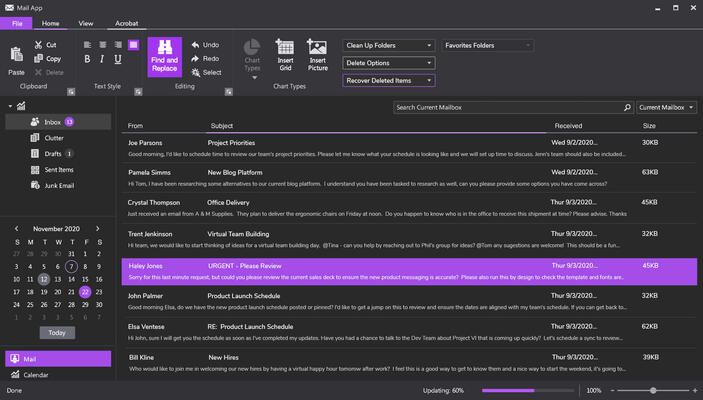
  • Calendar – NEW! - A WPF compatible calendar control that mimics the experience of the Windows 7 system calendar.
  • xamSchedule - Enhanced!
    • Date Navigator (NEW!) - A calendar control that is tightly integrated with xamSchedule to highlight dates with activity and display informative tooltips for each day that summarizes the activities scheduled for that day. The Date Navigator is also tightly integrated with the new Outlook Calendar View control to support synchronized date selection.
    • Outlook Calendar View (NEW!) - A new control that synchronizes Selection/Activation across any combination of DayView, MonthView and ScheduleView controls to simulate the look and behavior of Outlook’s calendar view.
    • Dialogs – New custom dialog windows for Tasks and Journals allow you to more completely mimic the Microsoft Outlook 2010-style user experience.
    • Resize Day View Headers - The Day View's header can now be resized and scrolled.
    • Resize Schedule View Headers - The Schedule View's header can now be resized.
    • Calendar Group Resizing and Scrolling - Where the xamSchedule controls allow the ability to display multiple groups of calendars; all groups are of equal size.  We've enhanced this so that you can now resize the calendars, or scroll different groups of calendars into and out-of-view.