Infragistics WPF 製品のすべてのコントロールは Infragistics Professional 及び Infragistics Ultimate にも含まれています。
Infragistics Professional :Ignite UI, ASP.NET, Windows Forms, Windows UI, Silverlight and WPFが含まれています。 Infragistics Ultimate Ignite UI, ASP.NET, Windows Forms, Silverlight, WPF, Windows UI, Windows Phone, LightSwitch, NUCLiOS, Iguana UI, NetAdvantage ICONS, 5 ユーザーQuince Subscriptionが含まれています。
Infragistics NetAdvantage for WPF adds Metro Style
Released: May 10, 2012
Updates in this release
Updates in 2012 Volume 1
Metro Style - Optimized for touch and touch targets
Gesture Support - Give your end users consistent interactions when moving between tablet and desktop experiences
Color Tuner - Style your entire application with just a few clicks of your mouse. You can easily apply themes throughout your application, color-tune a theme without writing any XAML code, and save/share your favorite color configurations for later use
Undo/Redo Framework - Provides the infrastructure for supporting unlimited linear Undo/Redo functionality
Undo/Redo History Stacks - The collections raise change notifications and therefore may be used as a source for providing a UI that displays the entries in the history stacks
ObservableCollectionWithUndo - The framework includes a derived ObservableCollection that makes it easier to add support for undo/redo of collection changes
Transactions - Provides the ability to group one or more operations into a single history entry. One may also rollback a transaction performing the operations that were stored up to that point
Commands - A number of built in commands are provided to make it easier to invoke an Undo/Redo operation from within your UI
Geographic Map - The rich thematic mapping solution allows you to visualize your geographic data in multiple ways
Sparkline Charts - Render highly visual charts within limited spaces, such as a grid cell
Pivot Grid - Give your users the analytical advantage with new filtering, dropdown, and summarizing capabilities
Bar Code - Added a property to hide the Human Readable text
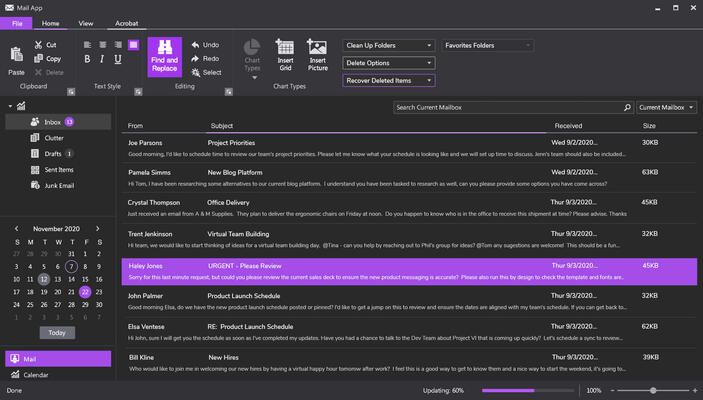
Ribbon - Let your end users customize tabs, groups and items to give them complete control over the application's user experience
Get Cell Text - Determine the text that would be displayed in Microsoft Excel cell given the cell’s value, format string, column width and worksheet options
Data Visualization and Line of Business Toolsets - Get over 50 types of charts, graphs, and gauges to make meaning of your business data
Motion Framework - Aimate your data over time, choreographing movements based on how you've decided to visualize their data
Org Chart - Create high performance, stylable organization charts that represent company, department, workgroup or other hierarchical structures
Network Node - Create visual representations of simple or complex network relationships
Timeline - Empower users to quickly understand and visualize a sequence of events
Treemap - Show the relative weight of data points at more than one level with no drilldown required
Zoombar - Provide end users with a pan and zoom user interface that allows them to intuitively scroll through a range of data with dynamically adaptive scaling