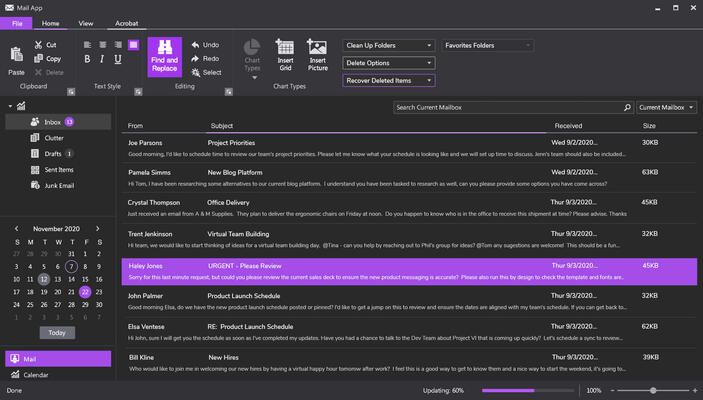
Infragistics Ultimate UI for WPF(英語版)

企業アプリ開発に不可欠な速度とスケーラビリティ、タッチ操作サポート機能すべてが備わったWPFコントロール

Infragistics 社の製品
1996 年より日本国内にてComponentSourceで販売中。

価格:¥ 269,610 (税込)〜 バージョン: 25.2 新機能 更新日: Mar 23, 2026 レビューの平均スコア: 4.00レビューの平均スコア: 4.00レビューの平均スコア: 4.00レビューの平均スコア: 4.00レビューの平均スコア: 4.00 (1)

i

Infragistics WPF 製品のすべてのコントロールは Infragistics Professional 及び Infragistics Ultimate にも含まれています。

Infragistics Professional :Ignite UI, ASP.NET, Windows Forms, Windows UI, Silverlight and WPFが含まれています。
Infragistics Ultimate Ignite UI, ASP.NET, Windows Forms, Silverlight, WPF, Windows UI, Windows Phone, LightSwitch, NUCLiOS, Iguana UI, NetAdvantage ICONS, 5 ユーザーQuince Subscriptionが含まれています。

Infragistics Ultimate UI for WPF のリリース

Released: Dec 22, 2017

17.2 Build 17.2.20172.2029 での更新項目

不具合の修正

  • Drag & Drop Framework
    • Cannot drag and drop items on modal dialog window when the solution is executed in debug mode, VS's UI debugging tools for XAML is enabled, and the dialog window is over the parent window.
  • Excel Library
    • Excel User defined functions are not evaluated after initial load.
  • Persistence Framework
    • Saving and loading the settings break the target control’s data binding.
  • Theme Manager
    • Themes are not properly applied to the XamTreeMap when using the ThemeManager.SetTheme...

Released: Nov 14, 2017

17.2 での更新項目

機能

  • Control Configurators
    • Visually configure the Linear Gauge, Radial Gauge, Bullet Graph, Pie Chart, and Category Chart controls.
    • Use QuickSets to take advantage of pre-designed styles, or customize your own.
    • Easily customize the design of elements such as needles, ranges and layouts.
  • New Royal Light Theme - A lighter version of the Royal Dark theme.
  • New Scatter and Shape Charts - Two new chart controls enable you to display X/Y data in a variety of scatter configurations, with smart data...

Released: Oct 20, 2017

17.1 Build 17.1.20171.2073 での更新項目

不具合の修正

  • Barcode Reader
    • Some pictures taken with a webcam cannot be decoded.
  • Busy Indicator
    • It is possible to tab into elements that are children of the XamBusyIndicator while it is busy.
  • Category Chart
    • XAxisTitleOpacity and YAxisTitleOpacity have incorrect default values, currently 0, should be 1.
    • XamCategoryChart Background property has no effect.
  • Color Picker
    • Binding error occurs when the SelectedColor property is set to null.
  • Color Tuner
    • Color Tuner is not properly installed in the Visual...

Released: Jun 22, 2017

17.1 での更新項目

機能

  • A new GeographicMapImagery CacheSize property has been added. This property can be used to limit the number of images in the tile cache of a multi-scale image.
  • A new Excel library property has been added. This property can be used to set the Dpi a Workbook uses for size calculations.

不具合の修正

Category Chart

  • Setting a transition of type SweepFromCategoryAxisMinimum, TransitionEasingMode EaseInOut and TransitionEasingFunction ElasticEase throws System.ArgumentException.

Combo Editor

  • Incorrect...

Released: May 22, 2017

16.2 Build 16.2.20162.2141 での更新項目

不具合の修正

Category Chart

  • Setting YAxisMajorStrokeThickness to negative number does not hide the grid lines.

Combo Editor

  • Changing ItemsSource and SelectedItems properties causes ArgumentNullException.
  • ResourceWasher does not wash XamComboEditor's thumb when the RoyalDark theme is applied.
  • Incorrect behavior occurs when resizing the popup to the top right corner of the screen and the WPF window is in maximized state.
  • FocusVisualElement is created in the ControlTemplate after the checkbox and the...

Released: Mar 31, 2017

16.2 Build 16.2.20162.2109 での更新項目

機能

  • Adds support for Visual Studio 2017.

不具合の修正

3D Surface Chart

  • Toolip flickers when hovering over the chart along the right border of a maximized window.

Category Chart

  • [DataAdapter] Binding to a collection of collections with different numbers of points prevents labels from being populated correctly.

Color Picker

  • AdvancedColorShadePicker style captions are ignored.

Color Tuner

  • Color Tuner is not installed in the Visual Studio 2017 RC.

Combo Editor

  • XamComboEditor text overlaps with the dropdown...

Released: Dec 20, 2016

16.2 Build 16.2.20162.2045 での更新項目

不具合の修正

Barcode Reader

  • Calling multiple Decode() functions in different threads causes InvalidOperationException.

Busy Indicator

  • Inconsistency in the assembly mapping for the primitives of the control.

Calendar

  • Unfocused SelectedDate(s) in the XamCalendar are barely visible.

Carousel List Box

  • An exception is thrown when the ItemContainerStyle property of the XamCarouselListBox is manually set or referenced with a key.

Combo Editor

  • Scrollbar appears every other time the combo is opened when the...

Released: Oct 24, 2016

16.2 での更新項目

機能

  • xamCategoryChart - New category chart can be easily configured to display category data using a simple API. All you need to do is bind your data (a collection or a collection of collections). By using a smart Data Adapter, the data is analyzed and the appropriate visualization is rendered. However, you can also explicitly specify the chart type by setting the ChartType to Line, Area, Column, Point, Spline, SplineArea, StepArea, StepLine, or Waterfall.
  • xamDataChart - significantly improved...

Released: Jun 27, 2016

16.1 (Build 16.1.20161.2056) での更新項目

不具合の修正

  • Charts
    • XamDoughnutChart - empty ItemLegend in a TabControl
  • Combo Editor
    • XamComboEditor does not get rendered correctly with the Windows Classic theme when an item is selected and the AllowsTransparency property of the Window is set to True.
    • SelectedItem disappears when XamComboEditor is located in a XamDataGrid's cell and changing DataSource.
    • SelectedItems does not work properly.
    • After deselecting an item from the combo editor's dropdown, the focus is set to the previously selected item...

Released: Apr 18, 2016

Updates in this release

Updates in 16.1

  • Gauge Needle Dragging - You can interactively drag gauge needles using the mouse to indicate new values.
  • Tab Dragging - You can now reorder tab items by clicking and dragging a tab item with your mouse to a new position.
  • XamDataGrid Improvements
    • Auto Edit Mode - You can now edit cells without having to press F2. Just select the cell and just start typing.
    • Field Grouping - You can now group multiple fields together under a single common header. This allows your end user to quickly...