
Microsoft Visual Studio 2013 Premium(英語版)
マイクロソフトのソフトウェア開発製品群及びそれらを管理する統合開発環境。
Microsoft 社の製品
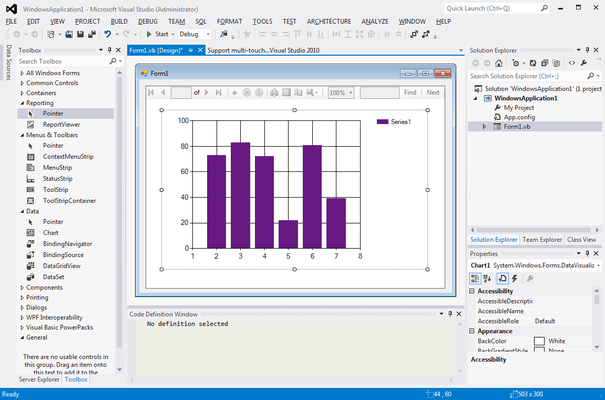
Microsoft Visual Studio 2013 下記のエディションがあります。
Microsoft Visual Studio Premium with MSDN は、ビジネス アナリスト、プロジェクト マネージャー、テスト担当者、開発者、運用担当者およびユーザーといったアプリケーション開発担当者が、それぞれのプロセスを統合してシームレスに共同作業を行うためのツールを提供します。また、アジャイル プロジェクトの計画と管理、関係者とユーザーの取り込み、開発者の生産性向上、品質の保証とテストの機能を通して、統合型の ALM ソリューションを提供します。さらに MSDN Subscription によって、開発や動作検証に必要となる新旧オペレーティング システム、新旧サーバー製品、Office system、およびマイクロソフトのプロフェッショナル エンジニアによる技術サポートが提供され、開発環境の構築を支援します。
Compare Visual Studio 2013 Editions
| Ultimate | Premium | Professional | Test Professional | |
| Debugging and Diagnostics | ||||
| IntelliTrace (Historical Debugging) | • | |||
| IntelliTrace in Production | • | |||
| Code Metrics | • | • | ||
| Graphics Debugging | • | • | • | |
| Advanced Web Debugging | • | • | • | |
| Static Code Analysis | • | • | • | |
| Debugger | • | • | • | |
| Windows 8 Simulator | • | • | • | |
| Profiling | Includes Tier Interaction Profiling | Includes Tier Interaction Profiling | • | |
| Windows Phone Emulator | • | • | • | |
| Testing Tools | ||||
| Web Performance Testing | • | |||
| Load Testing | • | |||
| Microsoft Fakes (Unit Test Isolation) | • | |||
| Code Coverage | • | • | ||
| Coded UI Testing | • | • | ||
| Manual Testing | • | • | • | |
| Exploratory Testing | • | • | • | |
| Test Case Management | • | • | • | |
| Fast Forward for Manual Testing | • | • | • | |
| Lab Management | • | • | • | |
| Extensible Testing Framework | • | • | • | |
| Unit Testing | • | • | • | |
| Integrated Development Environment | ||||
| Code Clone | • | • | ||
| LightSwitch | • | • | • | |
| One-Click Web Deployment | • | • | • | |
| Extensible WPF-Based Environment | • | • | • | |
| Model Resource Viewer | • | • | • | |
| Multi-Targeting | • | • | • | |
| Blend for Visual Studio | • | • | • | |
| JavaScript and jQuery Support | • | • | • | |
| Project & Solution Compatibility with Visual Studio 2010 SP1 | • | • | • | |
| Multiple Monitor Support | • | • | • | |
| Development Platform Support | ||||
| Windows Desktop Development | • | • | • | |
| Windows Store Application (including ARM) Development | • | • | • | |
| Web Development | • | • | • | |
| Windows Phone Development | • | • | • | |
| Office and SharePoint Development | • | • | • | |
| Cloud Development | • | • | • | |
| Customizable Development Experience | • | • | • | |
| Architecture and Modeling | ||||
| Architecture Explorer | • | |||
| Architecture and Layer Diagrams | • | |||
| Architecture Validation | • | • | ||
| UML® 2.0 Compliant Diagrams (Activity, Use Case, Sequence, Class, and Component) |
• | Read-Only Diagrams | ||
| Visualize Code with Dependency Graphs (By Assembly, By Namespace, and By Class) |
• | Read-Only Diagrams | Read-Only Diagrams | |
| Lab Management | ||||
| Virtual Environment Setup & Tear Down | • | • | • | |
| Provision Environment from Template | • | • | • | |
| Checkpoint Environment | • | • | • | |
| Team Foundation Server | ||||
| Backlog Management | • | • | • | |
| Sprint Planning | • | • | • | |
| Agile Task boards | • | • | • | • |
| Exception Analytics | • | • | • | • |
| SharePoint Integration (Team Project Portal) Microsoft SharePoint Server licensed separately |
• | • | Requires full Team Foundation Server and CAL |
• |
| Reporting & BI | • | • | Requires full Team Foundation Server and CAL |
• |
| Project & Project Server integration Microsoft Project and Project Server licensed separately |
• | • | Requires full Team Foundation Server and CAL |
• |
| System Center Integration Microsoft System Center licensed separately |
• | • | Requires full Team Foundation Server and CAL |
• |
| Version Control | • | • | • | • |
| Work Item Tracking | • | • | • | • |
| Build Automation | • | • | • | • |
| Collaboration | ||||
| PowerPoint Storyboarding | • | • | • | |
| Request and Manage Feedback End users can use the free Feedback Client to submit feedback to TFS, and access MSDN software to review the app and provide feedback. |
• | • | • | |
| Code Review | • | • | ||
| Task Suspend/Resume | • | • | ||
| Team Explorer | • | • | • | • |
| Team Explorer Everywhere for TFS (3rd-Party Development Tools Support) | • | • | • | • |
| Software and Services for Production Use | ||||
| Ultimate Feature Packs | • | |||
| Team Foundation Server | • | • | Requires MSDN Subscription | • |
| Team Foundation Server CAL | • | • | One Team Foundation Server CAL per subscription | • |
| Office Professional Plus | • | • | ||
| Project Professional | • | • | ||
| Visio Premium | • | • | ||
| Windows Azure Windows Azure benefits vary by offering |
• | • | • | |
| Software for Development and Testing | ||||
| Windows, Windows Server | • | • | Requires MSDN Subscription | • |
| Microsoft SQL Server | • | • | Requires MSDN Subscription | • |
| Microsoft Office | • | • | ||
| Microsoft Dynamics | • | • | ||
| All other Microsoft servers (SharePoint, Exchange, etc.) | • | • | ||
| Other Benefits | ||||
| Technical Support Incidents | 4 | 4 | 2 Requires MSDN Subscription |
2 |
| Microsoft E-Learning Collections (per year) | 2 | 2 | 1 Requires MSDN Subscription |
1 |
電話: (888) 850 9911
Fax: +1 770 250 6199


