













公式サプライヤー
公式および認定ディストリビューターとして200社以上の開発元から正規ライセンスを直接ご提供いたします。
当社のすべてのブランドをご覧ください。
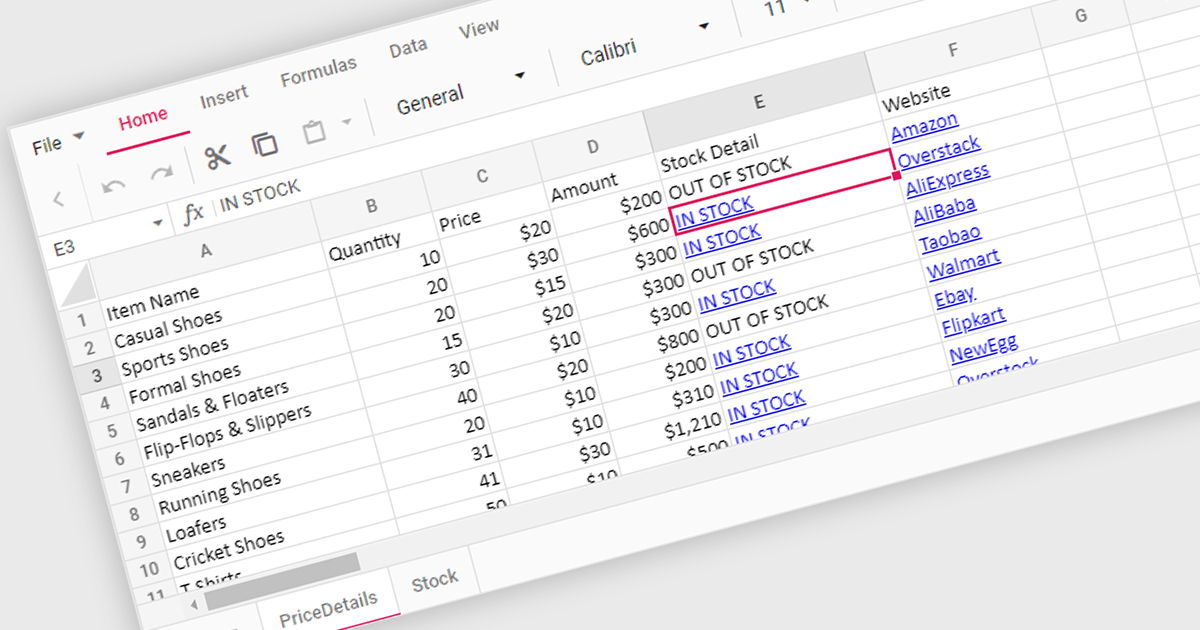
Hyperlink support in a spreadsheet control allows developers to integrate clickable links within cells. This functionality offers several advantages: users can seamlessly navigate to external web pages, reference internal documents within the spreadsheet itself (including across worksheets), and launch email compositions directly from specific cells. Hyperlink support enhances user experience by streamlining information access and promoting efficient data exploration within the spreadsheet.
Several React Spreadsheet controls offer Hyperlink support including:
For an in-depth analysis of features and price, visit our comparison of React Spreadsheet controls.
Aspose.Slides is a software development library that empowers applications to create, edit, and convert presentations without requiring Microsoft PowerPoint. Developers can leverage this API to programmatically manage text, shapes, tables, animations, and more within presentations, while also offering conversion capabilities to various formats like PDF, HTML, and image files.
Aspose.Slides 24.4 adds support for exporting PPTX to XML. XML offers a well-defined, text-based format that can be easily parsed and manipulated by various applications and programming languages. This allows developers to extract specific data or elements from presentations for further processing or integration with other systems.
To see a full list of what's new in Aspose.Slides version 24.4, see our .NET, Android via Java, Java, Node.js via Java, and PHP via Java release notes.
Aspose.Slides is offered as Developer Small Business, Developer OEM, Site Small Business, and Site OEM licenses catering to a range of business needs. Licenses are perpetual, and include 1 year of support and maintenance. Subscription renewals are also available. See our Aspose.Words licensing pages for .NET, Android via Java, Java, Node.js via Java, and PHP via Java for full details.
The ability to export PPTX to XML is available in the following Aspose.Slides platforms:
ONLYOFFICE Docs Enterprise Edition with Alfresco Connector combines an online document editor with a seamless integration for Alfresco Share, which is a content management platform that allows users to store, organize, and collaborate on documents and other digital assets. This integration allows teams to create, view, edit, and collaborate on spreadsheets, presentations, and text files online, directly within Alfresco Share using ONLYOFFICE editors, boosting efficiency and eliminating the need for file switching.
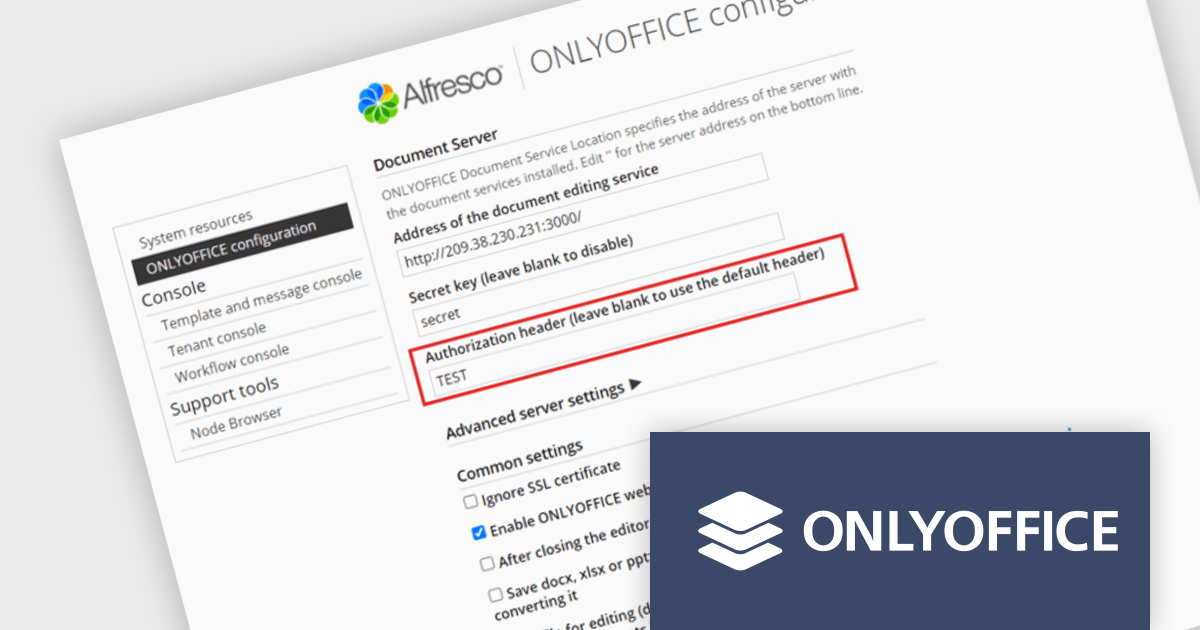
The ONLYOFFICE Alfresco Connector 7.0 update (available as part of ONLYOFFICE Docs Enterprise Edition with Alfresco Connector v8.0.1) adds advanced security options. It now uses JSON Web Token Secret and JSON Web Token Header to safeguard against unauthorized access, providing a higher level of protection. This release also gives administrators the flexibility to configure their own authorization headers directly on the editor's settings page, thereby offering a more tailored and secure document management experience.
To see a full list of what's new in ONLYOFFICE Docs Enterprise Edition v8.0.1 with Alfresco Connector 7.0, see our release notes.
ONLYOFFICE Docs Enterprise Edition with Alfresco Connector is licensed per server and is available as an annual license with 1 year of support and updates, or as a perpetual license with 3 years of support and updates. See our ONLYOFFICE Alfresco connector licensing page for full details.
For more information, see our ONLYOFFICE Alfresco connector product page.

Barcode functionality in Vue.js UI suites offers software developers an easy way to integrate barcode generation and scanning capabilities into their Vue.js applications. By leveraging barcode components, developers can quickly implement features like product lookups, inventory management, and asset tracking, without needing to delve into the complexities of low-level barcode processing. This ensures consistent data accuracy and integrity, as barcodes minimize human errors common in manual data entry. It also simplifies data management and boosts operational efficiency by facilitating rapid data processing and access.
Several Vue.js UI suites offer barcode functionality, including:
For an in-depth analysis of features and price, visit our comparison of Vue.js UI suites.
ONLYOFFICE Docs Enterprise Edition with WordPress Connector combines an online document editor with a seamless integration for WordPress, which is a content management system for creating and managing websites. This allows teams to create, view, edit, and collaborate on spreadsheets, presentations, and text files online, directly within WordPress, boosting efficiency and eliminating the need for file switching.
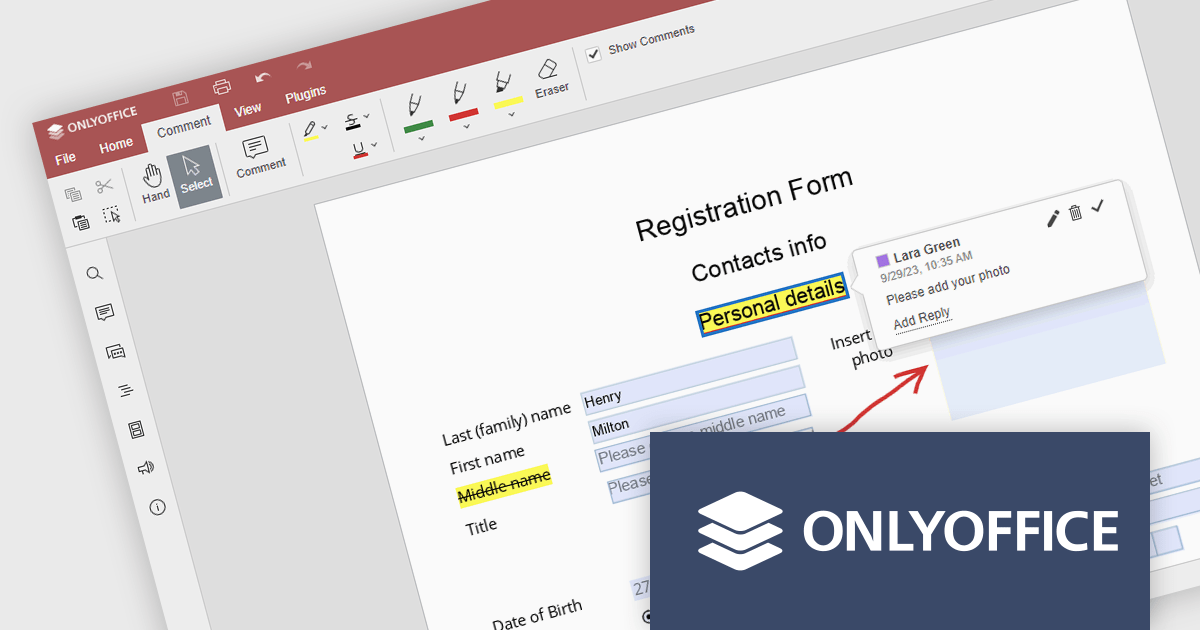
The ONLYOFFICE WordPress Connector 2.0.0 release (available as part of ONLYOFFICE Docs Enterprise Edition with WordPress Connector v8.0.1) brings the ability to open PDF files uploaded to your WordPress site directly within the admin dashboard for form filling and annotating using ONLYOFFICE Docs. You can fill out interactive fields, highlight, underline and strikethrough text, leave comments, and draw different objects and lines with the built-in drawing tools. By enabling seamless interactions with PDF documents directly within the platform and reducing the steps needed to edit or comment on PDF files, this capability streamlines document management workflows, optimizes productivity and eliminates the need for external software solutions.
To see a full list of what's new in ONLYOFFICE Docs Enterprise Edition v8.0.1 with WordPress Connector 2.0.0, see our release notes.
ONLYOFFICE Docs Enterprise Edition with WordPress Connector is licensed per server and is available as an annual license with 1 year of support and updates, or as a perpetual license with 3 years of support and updates. See our ONLYOFFICE WordPress connector licensing page for full details.
For more information, see our ONLYOFFICE WordPress connector product page.
電話: (888) 850 9911
Fax: +1 770 250 6199


